The ledger example is from one desktop guest run on . The screenshots show a separate desktop guest session with its own applicants and bills.
CHAPTER 01
Enter the guest game
- Lewati
Skip the opening story
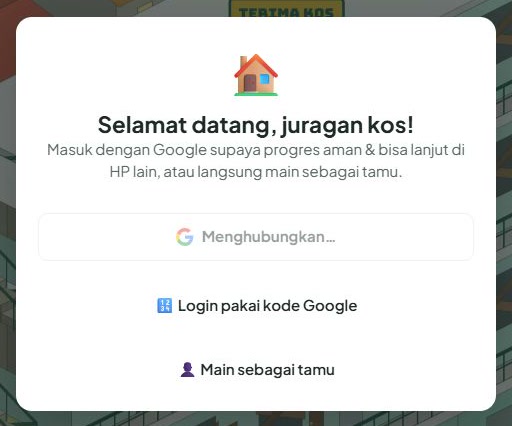
Look for the welcome panel and its sign-in choices. If it is already open, go straight to the guest option.
- Main sebagai tamu
Choose to play as a guest
Find the new boarding-house setup headed Buka kos baru.
CHAPTER 02
Open your boarding house
- Buka kos baru
Fill in your opening details
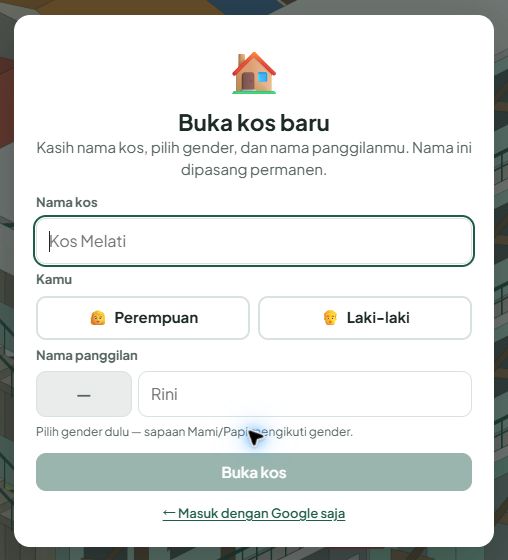
Enter the boarding-house name, choose your character’s form of address and type a nickname. The game says the name is permanent. Check all three fields before opening the house.
- Buka kos
Open the boarding house
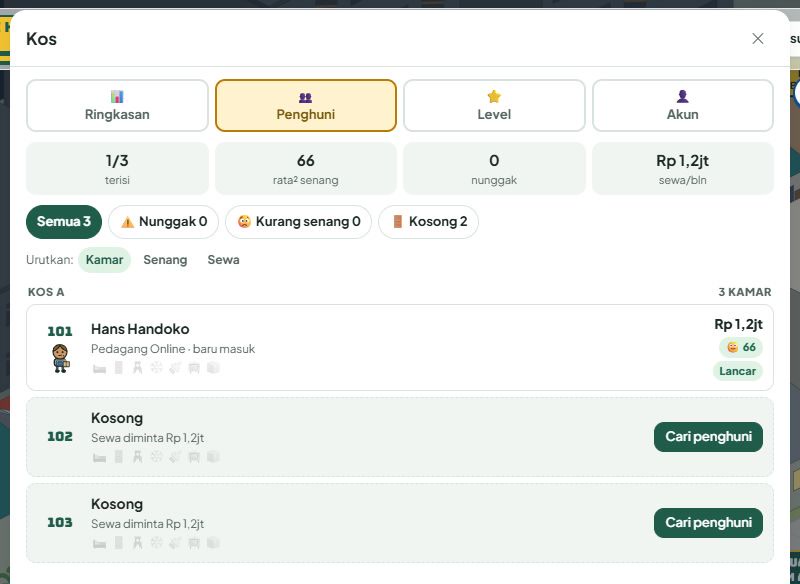
Find the room list and check for kosong. This guest run started with 3 empty rooms.
CHAPTER 03
Review the applicants
- Calon penghuni
Open the list of prospective tenants
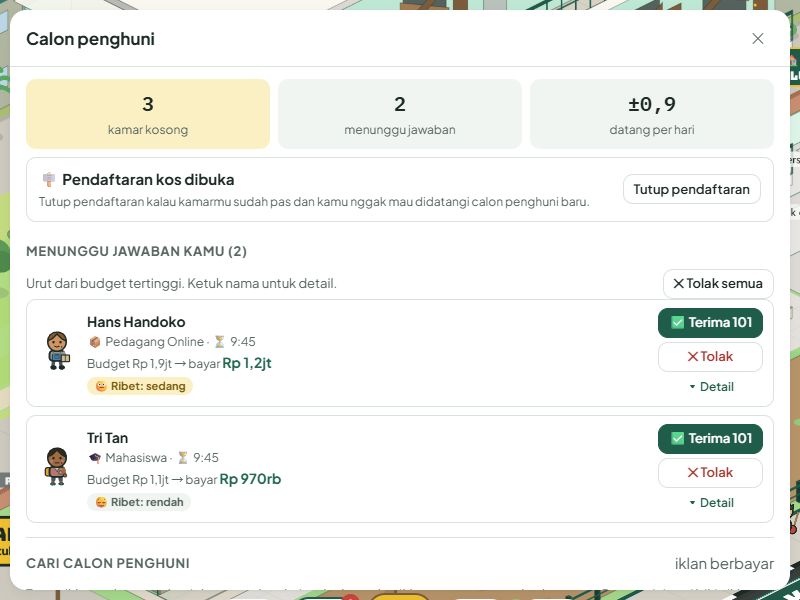
Look for menunggu jawaban, the number waiting for a response. This run showed 2. If the list is empty, leave registration open and check back. The game describes ads as a way to attract applicants faster.
- Nanti saja
Skip the ad offer if it appears
If applicants are already waiting and the game offers an ad, choose “Maybe later” to continue. Look for the applicant cards.
- Terima 101
Compare Budget and bayar, then accept
On the applicant card, Budget is the applicant’s spending limit (Rp1,700,000 here). bayar is the actual payment shown (Rp1,200,000 here). Use the bayar amount in your rent forecast. Choose Terima 101 to accept the applicant. Your button may show another room number.
Check the room list for terisi, meaning occupied. Room 101 changed from kosong to terisi and the waiting count fell from 2 to 1.
Which number is the rent?
Open Calon penghuni and read the amount after bayar on each card. When a card says Rp1,9jt → bayar Rp1,2jt, its budget is Rp1,900,000 and the offer is Rp1,200,000 per month. The game abbreviates juta (million) to jt and ribu (thousand) to rb.
| Applicant | Budget | Bayar | Gap |
|---|---|---|---|
| First applicant · original run | Rp1,700,000 | Rp1,200,000 | Rp500,000 |
| Hans Handoko | Rp1,900,000 | Rp1,200,000 | Rp700,000 |
| Tri Tan | Rp1,100,000 | Rp970,000 | Rp130,000 |
Using Hans’s Budget in the rent planner would overstate projected monthly rent by Rp700,000. Compare bayar across the waiting cards, then check the suggested room number before choosing Terima. After acceptance, open the room’s Harga tab to confirm the tenant’s current rent. The three values above are offers from the observed cards. Open the application panel screenshot or the Harga walkthrough.
Do you need to buy a recruitment ad?
Start with the waiting list
- Check kamar kosong to see how many rooms can take someone.
- Check menunggu jawaban for applicants already waiting. Both recorded guest runs had two applicants. We used Nanti saja when prompted and accepted the first tenant without buying an ad.
- If nobody is waiting, check that Pendaftaran kos dibuka is shown. The game describes word of mouth as a source of applicants while registration is open.
| Ad | Price | Listed boost | Duration |
|---|---|---|---|
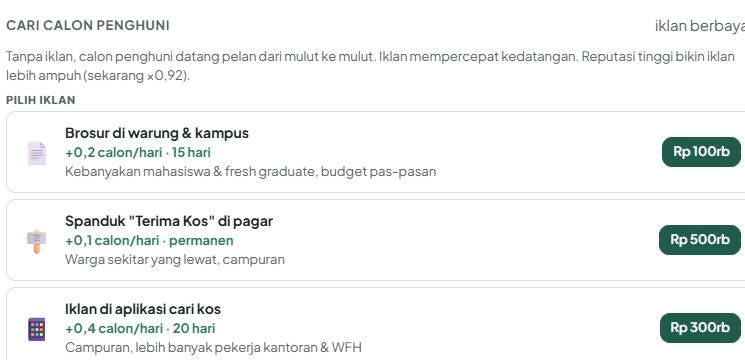
| Shop and campus flyers | Rp100,000 | +0.2/day | 15 days |
| Fence banner | Rp500,000 | +0.1/day | Permanent |
| Listing in a kos app | Rp300,000 | +0.4/day | 20 days |
If you decide to spend, compare the upfront price, the duration and the number of empty rooms you can actually fill. The panel also says the advertising effect depends on reputation. We captured the offers and skipped the purchase, so the number of applications and leases generated by each ad is unknown.
ROOM 101 · ORIGINAL GUEST RUN
What changed in the ledger?
| Account | Before | After |
|---|---|---|
| Rent due / month | Rp0 | Rp1,200,000 |
| Monthly bills | Rp705,000 | Rp765,000 |
| Projected monthly net | −Rp705,000 | +Rp435,000 |
| Cash on hand | Rp15,000,000 | Rp15,000,000 |
The rent due and bills changed immediately in the monthly forecast. Cash remained Rp15,000,000. The Rp60,000 bill increase is inferred from the two snapshots.
Why did the forecast rise while cash stayed flat?
| Checkpoint | Monthly bills | Monthly net |
|---|---|---|
| Original run · before | Rp705,000 | −Rp705,000 |
| Original run · after | Rp765,000 | +Rp435,000 |
| Screenshot run · after | Rp825,000 | +Rp375,000 |
| Screenshot run · later | Rp825,600 | +Rp374,400 |
In the original run, accepting room 101 added Rp1,200,000 of monthly rent and increased the monthly bill estimate by Rp60,000. The monthly result improved by Rp1,140,000, and Kas still showed Rp15,000,000 at both checkpoints. In the screenshot run, rent was also Rp1,200,000 after acceptance, but the forecast showed a larger bill.
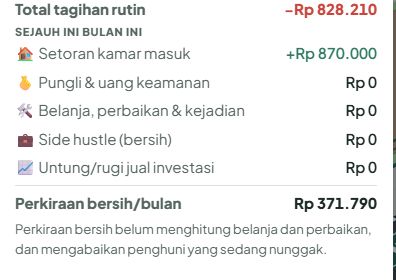
For a cash check, record Kas and Setoran kamar masuk (room payments received) from the same in-game moment. For a forecast, use Total pemasukan and Total tagihan rutin. The later screenshot run shows Rp1,200,000 in forecast income and Rp0 in room payments received so far that month. See the itemized bills and finance screenshot.
How do you collect a room’s rent?
Open Kos, choose Terisi to see the occupied rooms, and open the tenant’s room. If a moneybag beside the room title shows an amount, select it and check Kas for the new cash balance. Open Keuangan and look under Sejauh ini bulan ini (this month so far) for Setoran kamar masuk, the room payments recorded so far.

| Checkpoint | Cash on hand |
|---|---|
| Before selecting the moneybag | Rp15,200,000 |
| Immediately after collection | Rp16,070,000 |
| Cash received | +Rp870,000 |
The room still showed a monthly rent of Rp1,200,000. The amount available to collect at this checkpoint was Rp870,000. That receipt updates the cash balance. Use the monthly rent for the planner’s rent field and the latest cash balance for the cash reserve field.